Syskey is short for System Key. It is also known as SAM Key. Security Account Manager and it is 128 bit-RC4 Encryption key. The process of conversion of data into Cipher text is called Encryption.
Cryptography is a piece of information that determines and done using a particular algorithm. Cryptography is a branch of science which is mainly used for the hiding the actual data from the normal users. For example at the time of Mumbai Taj attack the main culprit (name not mentioned). His laptop and related electronic gadgets were sent for analysis. In that they didn’t find anything suspicious. They had found only the image of Bruce Lee. The cybercrime team had sent for analyzing, they found that the images of Taj hotel and related images were hidden inside the Bruce Lee image. This is one form of Encryption. Data can be stored or can be converted to cipher text using many algorithm based on the complexity.
Steps for Setting Syskey in computers
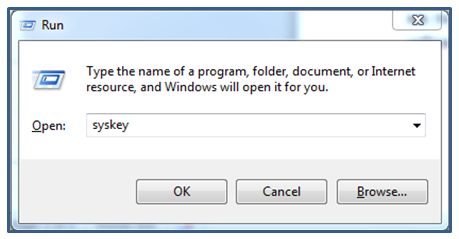
Press Windows key along with ‘R” key in the Keyboard
Type syskey press Enter key.
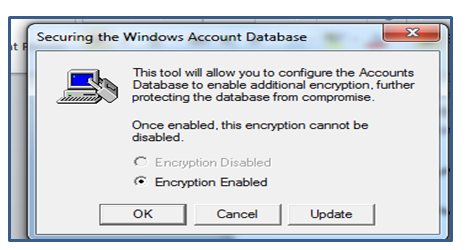
Select Update option from dialog box.
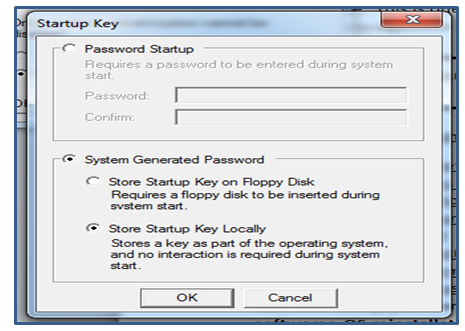
Use Password start up.
Create Password
Select Update option.
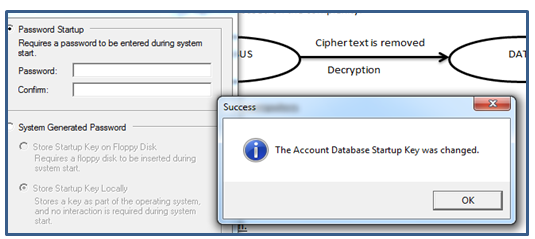
Restart the system.
Syskey Startup password will be active.
NB: This startup password cannot be break using normal encryption method or any third party software. OS reinstallation and Hirren Boot is the only solution for this encryption method.
Operating
System controls and co-ordinates the overall working of a computer. It can act
as a
Command Interpreter – Computer is Hardware. Computer uses Machine language. This is the only language which is understandable to the computer. This language cannot be understood to the User. So the command from the user needs to translate the language of the user to Machine language. Machine language was the language which uses 0 and 1. So the language is converted to Machine language and vice versa.
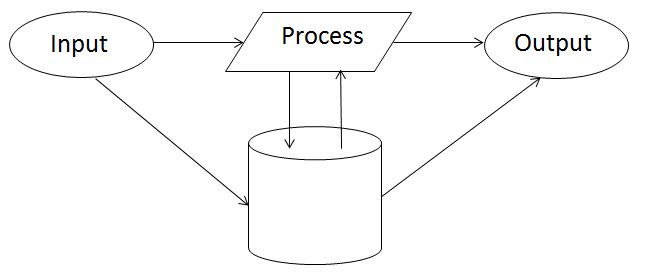
Input / Output Bounding – Input and output are the basic components of a computer.
Input – The work given to
the computer .
Process – The work done
by the computer.
Output – The processed
Input is called Output.
For example: 15 + 15 = 30
Input
are : 15,15
Output
: 30
Process
: +,=
When we give input to the computer
the input is first transferred to the Primary Memory. No operation can be done
without Memory. After the transferring of Input the Input is moved for
Processing. After processing the processed
input is again transferred to Memory later to Output devices. The main function
of Operating is system to coordinates the input, process and output.
Memory Allocation
–If the process needs memory for the working, Operating system asks for the
memory from Memory unit. Memory unit is responsible for the Memory size of the
memory devices.
Time
allocation – The Operating system allocates the time for each
task to complete. If the task is not completed on time, the work is rescheduled
and it waits for the completion. Still the work is incomplete, the work is terminated.
Types of Operating system
Operating systems are classified into as
according to the mode of users.
Single
User
Multi
user
Operating system is classified
according to the working.
Single
Task
Multi
Task
Batch
processing Operating system
Single
processing Operating System
Multi-Processing
Operating system
Single User: Only a single user can use it. Ex: Windows XP,
7, 8, 10 etc.
Multi user: More than
one user can use it. Linux, Unix, etc.
Single Task: It can process only single task. Ex: MS-DOS.
Multi Task: It
can process more than one task. Ex: Microsoft Windows
Batch
Processing Operating System: It is a type of operating system which
collects all jobs and makes it into several batches. After that the process is
executed by each batch.
Single Process Operating System: Can process only a single
process at a time.
Multi process Operating System: Can process more than one
process at a time. Ex: Windows.
BIOS
BIOS is short form of Basic Input Output System. It acts as an operating system to a particular extent. BIOS is not actual operating system. It can be viewed only at the time of booting. It controls the whole computer till the operating system loads. BIOS can shows System Information, System date and time, Boot configuration, USB configuration etc. We can reinstall our Operating System using this BIOS boot configuration. Boot device priority is the feature of the BIOS. By changing the Priority we can install our operating system. This BIOS can be viewed by pressing the functional keys or Delete key at the time of booting. This BIOS can be protected by using the Password and this Password can be reset by removing the Jumper from the Mother board. Jumper is a pin in the motherboard. If it is removed the system configuration will be set to default.




 techquora